High Rejection Rate in Color Sorting: How to Identify, Reduce & Prevent Product Loss
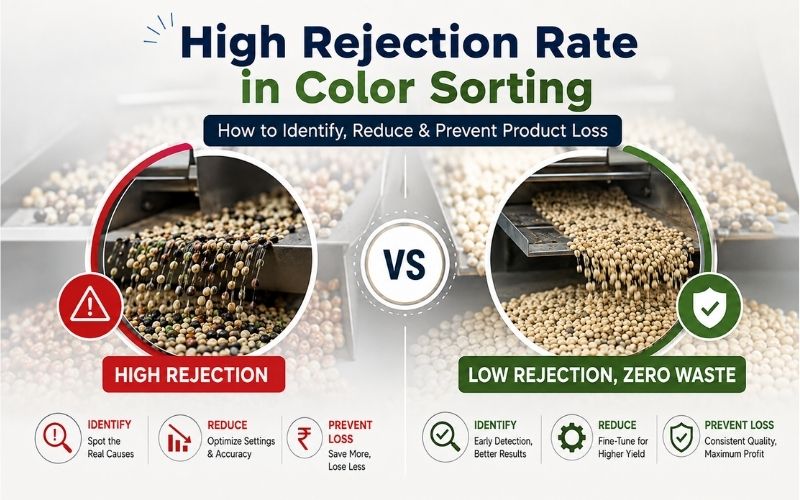
Table of Contents
- 1. What Is Rejection Rate in Color Sorting?
- 2. Signs Your Color Sorter Is Rejecting Too Much Good Product
- 3. Common Reasons Behind a High Rejection Rate
- 4. The Impact of Incoming Product Quality on Sorting
- 5. How to Identify Product Loss in the Reject Stream
- 6. Ways to Reduce False Rejection & Improve Recovery
- 7. Color Sorter Rejection Rate: A Practical Optimization Checklist
- 8. Conclusion
It might be possible that your color sorter is rejecting more good product than it should, turning perfectly usable material into unnecessary product loss. Before you start blaming the machine, let’s take a closer look and find out what’s really causing the high rejection rate. A high rejection rate doesn’t always mean better quality. Sometimes, it can be a sign of incorrect settings, poor calibration, inconsistent feeding, or problems with the incoming material. This guide is made for you to understand what’s going wrong, identify the real cause, and learn how to reduce and prevent unnecessary product loss.
What Is Rejection Rate in Color Sorting?
Rejection rate in color sorting simply means the percentage of material that a color sorter removes from the good product because it detects defects, discoloration, foreign particles, or other unwanted material. In simple words, it tells you how much product the machine is rejecting during sorting. Some rejection is normal, but if the rate is too high, it could mean that good product is also being rejected. That’s why keeping an eye on the rejection rate can help you understand whether your color sorter is working efficiently or causing unnecessary product loss.
Signs Your Color Sorter Is Rejecting Too Much Good Product
- Reject Rate Is Unusually High: If your color sorter is rejecting much more material than it normally does, but the incoming material quality has not really changed, something may be wrong. For example, if your usual rejection rate is around 3% but it suddenly reaches 6%, it is worth checking the machine settings and sorting conditions.
- The Reject Bin Contains Too Much Good Material: This is one of the easiest things to check. Just take a look at the reject material. If you’re finding a lot of good-looking rice, grains, or seeds mixed in with the actual defects, your sorter may be working a little too aggressively.
- Yield Drops Without a Real Quality Improvement: If you are losing more product but the quality of your final output is not improving much, the machine may be sorting too aggressively. In simple words, you are losing good product without getting a meaningful quality benefit in return.
- Ejectors Are Firing Too Often: Ejectors should fire when the machine detects a genuine defect. If you notice them firing almost continuously or in large clusters, your sorting thresholds or timing settings may be too tight.
- Camera or Lighting Performance Has Changed: Sometimes, the problem is surprisingly simple. Dusty lenses, dirty sensors, or changes in LED lighting can affect what the sorter sees. If the machine isn’t getting a clear view of the product, it may start rejecting material that is actually good.
Common Reasons Behind a High Rejection Rate
1. Sorting Settings Are Too Aggressive
Start by checking your sorting settings. If the sensitivity or rejection threshold is set too high, the machine can start rejecting good product along with the actual defects. This is one of the first things you should check when the rejection rate suddenly goes up.
2. Poor Calibration
Next, take a look at the calibration. Your color sorter needs to be properly calibrated for the material you are sorting. If the calibration is not right, the machine can have trouble telling good product apart from defects and may reject more than it should.
3. Excessive Dust on the Product
Now check the incoming material. If there is too much dust, it can make it difficult for the camera and sensors to clearly see the product. As a result, the machine may mistake some good material for defects and reject it.
4. Uneven Material Feeding
Keep an eye on how the material is entering the sorter. If the flow is too fast, too slow, or uneven, the machine may not get a clear view of every piece. This can lead to more unnecessary rejection.
5. Similar-Looking Good and Defective Material
Sometimes, the good product and the defective material simply look too similar. When the difference is very small, the sorter can find it difficult to separate them correctly and may reject some good product along with the defects.
The Impact of Incoming Product Quality on Sorting
When it comes to color sorting, the quality of the incoming material becomes very important because it directly affects sorting performance, product recovery, and the final output quality. Your color sorter has to deal with whatever you feed into it, so dust, broken pieces, mixed sizes, moisture, and a high level of defects can make the sorting process more challenging.
Some batches are relatively clean and consistent, while others may contain more impurities and defects. For example, clean and properly pre-cleaned rice allows the sorter to identify unwanted grains more easily, while dusty or highly mixed material can make accurate detection more difficult.
The table below will help you quickly understand how different incoming material conditions can affect color sorting, including detection, rejection rate, product recovery, and overall sorting performance.
| Incoming Product Condition | What Happens During Sorting | Impact on Rejection | Product Recovery |
|---|---|---|---|
| Clean & Pre-Cleaned Material | Defects are easier to identify | Controlled | Higher |
| Excessive Dust | Camera may have difficulty seeing the product clearly | Can Increase | Can Decrease |
| High Defect Content | More unwanted material needs to be removed | Naturally Higher | Depends on Defect Level |
| Mixed Product Sizes | Product may not be presented consistently | Can Increase | Can Decrease |
| High Broken Content | More broken pieces may need to be separated | Can Increase | Can Decrease |
| Uneven Feeding | Product may not pass through the sorting area consistently | Can Increase | Can Decrease |
How to Identify Product Loss in the Reject Stream
Step 1 - Check What’s Going Into the Reject Stream
Start by taking a small sample from the reject stream and have a proper look at it. Don’t just check it quickly. See how much of the material is actually defective and how much good product is being rejected along with it.
Step 2 - Separate Good and Defective Product
Now, separate the sample into two groups. Keep the good product on one side and the actual defects on the other. This makes it much easier to see whether your sorter is removing only the unwanted material or taking good product with it too.
Step 3 - Calculate the Good Product Loss
Next, check how much good product you are finding in the reject material. For example, if you check 10 kg of rejected material and find 1 kg of good rice, that means around 10% of your reject stream could actually be recovered.
Step 4 - Check Different Batches
Don’t make a decision based on just one sample. Check the reject material at different times and across different batches. If you keep finding good product in the reject stream, there may be a false rejection issue.
Step 5 - Compare It With Your Recovery
Now compare this with your overall product recovery. If good product is going into the reject stream and your recovery is also dropping, it’s a good idea to check your sorting settings and machine performance.
Step 6 - Check Again After Making Changes
After adjusting the machine settings, check the reject stream again. Compare the results before and after the changes. This will help you see whether you have actually reduced good product loss without affecting the final product quality.
Ways to Reduce False Rejection & Improve Recovery
Step 1 - Check Your Current Sorting Settings
Start with the settings before making any major changes. Check the sensitivity, thresholds, and other sorting parameters to make sure the machine is not set too aggressively. Small adjustments can help reduce the chances of good product being rejected.
Step 2 - Check the Reject Material
Take a sample from the reject output and see what is actually being removed. If you find a noticeable amount of good rice, grains, seeds, or other usable material, you have a clear indication that false rejection needs attention.
Step 3 - Calibrate the Sorter Properly
Your sorter needs to be calibrated according to the material you are running. Make sure the cameras, sensors, and sorting parameters are properly adjusted so the machine can clearly distinguish between good product and actual defects.
Step 4 - Keep the Product and Machine Clean
Dust can make accurate detection more difficult. Make sure the incoming material is properly cleaned and regularly check the camera lenses, sensors, chutes, and other relevant parts of the sorter to maintain clear detection.
Step 5 - Maintain a Consistent Feed
Keep the material flow steady and consistent through the sorting chamber. Avoid overfeeding or uneven feeding, as the sorter needs a clear view of the product to make accurate decisions and avoid unnecessary rejection.
Step 6 - Monitor Recovery and Fine-Tune
Don’t just focus on how much defective material is being removed. Keep an eye on product recovery and regularly check the reject output. If good product is still being lost, fine-tune the settings until you get the right balance between product quality and recovery.
Color Sorter Rejection Rate: A Practical Optimization Checklist
Keeping the rejection rate under control can feel a little confusing when there are so many things that can affect sorting performance. But don’t worry. If you check a few important things regularly, you can easily spot what is causing unnecessary rejection and keep your recovery on track.
Before you make any major changes, go through this quick checklist:
1. Raw Material Quality
- Check the incoming material for dust, broken pieces, defects, moisture, and impurities.
- Consistent and properly cleaned material makes sorting easier.
2. Camera and Lens Cleaning
- Make sure the cameras, lenses, and viewing areas are clean.
- Dust or residue can affect detection and lead to unnecessary rejection.
3. Calibration
- Check that the color sorter is properly calibrated for the material you are processing.
- Correct calibration helps the machine separate good product from actual defects more accurately.
4. Sensitivity Settings
- Review the sensitivity and sorting thresholds regularly.
- Very aggressive settings can cause good product to be rejected along with defects.
5. Uniform Feeding
- Make sure the product is flowing evenly through the sorting area.
- Uneven or excessive feeding can make accurate detection more difficult.
6. Air Pressure and Ejectors
- Check that air pressure is stable and ejectors are working properly.
- Incorrect pressure or delayed ejector action can affect sorting and product recovery.
7. Reject Stream
- Take a sample from the reject stream and check how much good product is being lost.
- If you regularly find good material in the rejects, it may be a sign of false rejection.
With this simple checklist, you can keep a closer eye on your color sorter and catch small issues before they turn into bigger product losses. Regular monitoring helps reduce false rejection, maintain better recovery, and keep sorting performance consistent.
Conclusion
A high rejection rate and false rejection are two different problems, but they share one thing in common: both can affect your product recovery and overall profitability. The good news is that with the right approach, both can be managed.
If you're dealing with a high rejection rate in a color sorter, start by checking the basics. Inspect the incoming material, check the settings, calibrate the machine, clean the cameras and lenses, maintain uniform feeding, and keep an eye on the reject stream. Don't wait until product loss becomes a bigger problem.
For false rejection, it's less about making the machine reject less and more about making it reject correctly. Regularly checking the reject material, measuring good product loss, and fine-tuning the sorting parameters can help you find the right balance between removing defects and recovering good product.
At the end of the day, good color sorting is not just about removing unwanted material. It's about maintaining quality while recovering as much good product as possible. You put valuable material into the machine, so it's worth making sure as little of it as possible goes to waste.
We will be back with the next blog soon. Till then, stay tuned!
Frequently Asked Questions
1. Why is my color sorter rejecting too much good product?
This can happen when the sorting settings are too aggressive, the machine is not properly calibrated, or the incoming material is difficult to sort. Start by checking the settings and the reject material to see how much good product is being lost.
2. How do I know if my color sorter is rejecting good rice or grains?
Take a small sample from the reject stream and separate the good product from the actual defects. If you regularly find a noticeable amount of good rice, grains, or seeds in the reject material, your machine may be causing false rejection.
3. Why has my color sorter rejection rate suddenly increased?
First, check whether the incoming material has changed. If the material quality is similar to your usual batches, check the machine settings, calibration, feeding, and camera or lens condition to find the reason for the increase.
4. How can I reduce good product loss from the reject line?
Check your sorting settings, keep the optical area clean, maintain proper calibration, and make sure the product is feeding evenly. Most importantly, regularly check the reject stream and adjust the machine based on what you find.
5. How can I improve product recovery without affecting quality?
The goal is not simply to reduce rejection. You need to find the right balance between removing defects and keeping good product. Regularly monitor the rejection rate, inspect the reject stream, and fine-tune the sorting settings based on actual results.